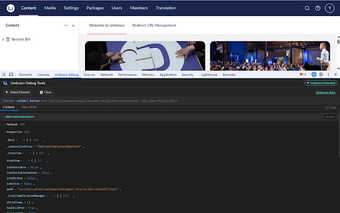
Browser extension for quick Umbraco front-end inspection and debugging
Umbraco Debug Tools, by The Scandi Web, is a Chrome extension for developers and QA who work with the Umbraco CMS. It inspects front-end pages to reveal CMS metadata without switching to the backoffice, helping teams map pages to content items. The tool reports environment labels and integrates with performance tooling, making it useful for technical editors and engineers focused on faster page verification and environment awareness.
What the extension does for front-end-to-CMS mapping
The extension targets front-end inspection on Umbraco-powered sites so developers and QA can read CMS metadata inside the browser. It detects the current Node ID and the Document Type alias to help teams match rendered pages to content items without constantly opening the backoffice. That immediate mapping reduces context switching for users who verify content structure against live output.
How much overhead it adds to everyday browsing
Memory and UI impact are kept low because the extension activates only when it detects Umbraco headers and metadata. No server-side installation is required for basic detection, so the extension remains idle on unrelated sites. This design keeps the toolbar idle during normal browsing, reducing distraction and preserving browser resources for typical development tasks.
How it integrates into Umbraco debugging workflows
The extension combines environment awareness and profiling integration by reporting the active Template alias and CMS version, surfacing environment labels (local, staging, production), and providing links into the backoffice editor when available. It also integrates with the Umbraco MiniProfiler to toggle performance metrics. Common workflow steps include:
- confirming environment before making edits
- opening profiler metrics for performance checks
- using deep links to reach the editor when authenticated
What limitations teams should plan for
Certain capabilities depend on server or session state: deep edit links require an authenticated backoffice session, and MiniProfiler features require the CMS to expose profiling data. The extension is purpose-built for Umbraco sites and supports Chromium-based browsers only, so teams that use other CMS platforms or non-Chromium clients should expect limited applicability.
Focused utility for Umbraco teams, with clear trade-offs
Because it activates only on Umbraco sites and is maintained by Scandi Web, the extension serves teams embedded in that CMS well, improving verification workflows and environment clarity. Expect a narrow, purpose-built tool rather than a general developer toolbar; organisations that need cross-CMS diagnostics or non-Chromium compatibility should consider those trade-offs, and some diagnostics require server-side profiling to be enabled.